If Remote Desktop is enabled on Windows 11 25H2 but other computers still cannot connect, forcing RDP to use TCP instead of UDP may fix the problem.
We encountered this on a fresh, fully updated Windows 11 25H2 installation.
The computer could be pinged, Remote Desktop was enabled, the firewall had been ruled out, and multiple computers on the same network were unable to connect.
Disabling RDP over UDP fixed the problem.
Disable RDP UDP
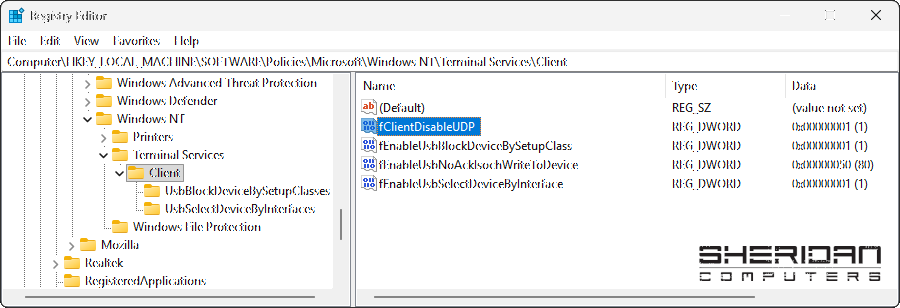
Open Registry Editor and browse to:
HKEY_LOCAL_MACHINE\SOFTWARE\Policies\Microsoft\Windows NT\Terminal Services\Client
If the Client key does not exist, create it.
Right-click in the right-hand pane and select:
New > DWORD (32-bit) Value
Name the new value:
fClientDisableUDP
Double-click it and set the value to:
1
Close Registry Editor and restart the computer.
Remote Desktop should now use TCP instead of UDP.
Using PowerShell
You can also apply the same setting from an elevated PowerShell window:
New-Item -Path "HKLM:\SOFTWARE\Policies\Microsoft\Windows NT\Terminal Services\Client" -Force | Out-Null
New-ItemProperty -Path "HKLM:\SOFTWARE\Policies\Microsoft\Windows NT\Terminal Services\Client" -Name "fClientDisableUDP" -PropertyType DWord -Value 1 -Force
Restart Windows after applying the change.
Symptoms We Saw
This fix may be worth trying if:
-
Remote Desktop is enabled
-
The computer responds to ping
-
Windows Firewall has been ruled out
-
Port 3389 should be available
-
Multiple computers are unable to connect
-
The affected computer is running Windows 11 25H2
In our case, the affected computer was a completely fresh Windows 11 25H2 installation rather than a machine that had broken after a Windows update.